
Why This Incident Changes the Checklist
An AI extension is not just a convenience feature inside an editor. In a small business it can sit beside source code, deployment credentials, client websites, internal automation and the files that explain how work gets done. That makes the extension's origin and update history part of your operating record, not a detail to remember only after a security notice.
On 29 October 2026, Cursor reported that a modified copy of the Claude Code extension was available in its VS Code Extension Marketplace. The affected package was identified as anthropic.claude-code, versions 2.1.312 and 2.1.313, for macOS and Windows, during a stated Pacific Time window. Cursor said the malicious versions were not developed by Anthropic. That is a specific distribution event, not evidence that every Claude Code installation or every marketplace is compromised.
Microsoft's follow-up analysis adds the operational detail that matters to an Australian SMB: the injected loader attempted to collect host information, add an SSH key, enable local SSH, create reverse forwarding and establish persistence. Microsoft also says the malicious packages were not published or distributed from the Microsoft Visual Studio Marketplace or the official npm package named in its analysis. Those boundaries are useful, but they do not let a manager declare a machine safe from a version number alone.
The practical change is simple: when a new advisory names a product, your team should be able to answer which machine, which identifier, which version, which source, which platform and which time. If the answer is “we do not know”, that is a useful status. It is safer than filling the gap with an assumption that the package came from an official source.
RxAI Insight
A version tells you what was installed. An origin record tells you how to decide whether that version belongs in the incident scope.
What the Sources Actually Establish
The first-party sources support four statements that should stay together. First, the incident was associated with a named extension identifier, two versions, two operating systems and one marketplace. Second, the package attempted behaviours that are relevant to persistence and remote access. Third, the official investigations distinguish the Cursor marketplace from the Microsoft Visual Studio Marketplace and the official npm distribution. Fourth, a business should preserve evidence and investigate a matching installation rather than treating uninstall as the whole response.
Cursor's notice tells affected users to check whether the named versions came from the Cursor marketplace during the stated window, search endpoint, network and extension-installation telemetry, isolate hosts showing evidence of execution or backdoor installation, and review credentials and sessions accessible from those hosts. It also warns that uninstalling may not remove standalone persistence scripts. These are response instructions for a defined condition; they are not a promise that a simple local check can certify a device.
Microsoft's research makes the same distinction in a different way. It describes the code's capabilities and attempted sequence, then notes that successful remote access depends on privileges, SSH configuration and the attacker's server. A failed tunnel does not prove that no key or persistence artifact was written. In other words, attempted behaviour and confirmed execution are different evidence levels. Your internal register should preserve that difference.
This is also why a secondary article should not become the only source for a decision. Sophos provides useful independent analysis, but the package identity, marketplace boundary, official remediation guidance and product controls should be checked against the original Cursor, Microsoft, Cursor documentation and VS Code documentation. The evidence hierarchy is part of the workflow: start with the vendor or researcher closest to the event, then use independent commentary to expose gaps or practical questions.
Why a Version-Only Check Fails
A version is a label, not a complete provenance record. The same identifier may be visible in an editor, in a lock file, in a download record or in a different distribution channel. Those locations do not carry the same meaning. If a team sees 2.1.313 and stops, it has not yet answered where the package came from, when it arrived, whether it ran, or whether the relevant operating system and time window match.
For example, the Microsoft analysis explicitly separates the Cursor marketplace event from the Microsoft Visual Studio Marketplace and the official npm package. That does not turn another marketplace into a permanent safe list. It means that a responsible check should preserve the source as a field and should not broaden a narrow advisory into an unsupported conclusion. A row marked “unknown origin” remains unresolved until someone can find an installation record, administrative policy, endpoint record or other authorised evidence.
This provenance habit is the same control principle used in a publishing provenance log: record what entered the workflow, from where, and what a human verified before the next action. It is also consistent with the advice in RxAI's guide to package reusable AI workflows. Portability is useful only when the package's permissions, dependencies and approval trail travel with it.
The Inventory Australian SMBs Can Use
You do not need a new security platform to make the first decision better. Start with a small, explicit inventory for the AI editors and extensions that can touch business work. The point is not to collect every possible detail. The point is to collect the fields that let an information owner compare a real installation with a published advisory without guessing.
| Field | Minimum record | Why it matters |
|---|---|---|
| Extension identity | Publisher and extension ID, such as publisher.extension | Prevents a display name from being mistaken for a unique package. |
| Version | Exact version string, not “latest” | Lets you compare a row with a narrow advisory and preserve change history. |
| Origin | Marketplace, package registry, managed deployment or unknown | Separates a defined distribution scope from an unsupported generalisation. |
| Platform | macOS, Windows or Linux, plus the responsible device owner | Connects the record to the source's platform and investigation boundary. |
| Install or update time | Timestamp with timezone, or an explicit unknown value | Allows the team to compare the machine with the source's time window. |
| Decision and evidence | In scope, outside recorded scope, information missing or escalated; link to the record | Preserves what was checked without turning a triage label into a safety certificate. |
Keep the owner visible. In a ten-person studio, this may be the technical lead or operations manager; in a larger SMB, it may be the person responsible for endpoint management. The owner is not expected to perform forensic analysis. Their job is to make the row complete, identify what is missing, and hand a matching or suspicious row to the person authorised to investigate.
For VS Code specifically, the official documentation lists code --list-extensions --show-versions as a way to display installed extension identifiers and versions. The command does not prove the installation origin, it does not cover every editor, and it does not declare a machine clean. Treat it as one read-only input to the inventory. For Cursor or a managed deployment, use the product's approved inventory or endpoint record rather than assuming a VS Code command is a complete substitute.
First-Hand Evidence: What We Measured on 1 November
The source package includes a small, reproducible local test so the article can show how the triage logic behaves when information is incomplete. On 1 November 2026 at 19:45:54 Australia/Sydney, the test read nine synthetic extension install or update records. It classified each record by identifier, version, origin, platform, timestamp and an illustrative reported-artifact flag. The test made no network request, inspected no installed extension directory, called no model, changed no system setting and used no credential.
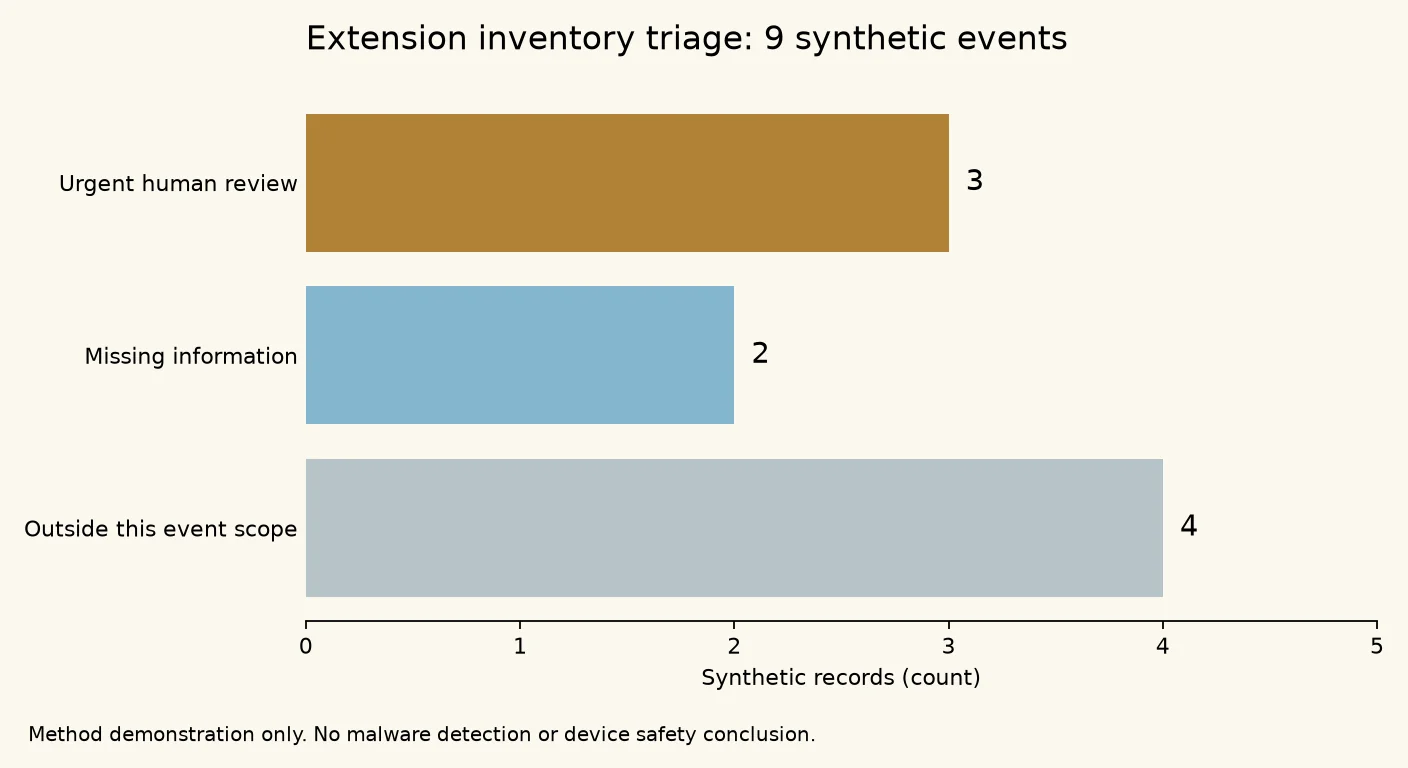
2026-11-01_ai-extension-install-source-audit/evidence/outputs.json; runtime, inputs and limitations are recorded in evidence/run_metadata.json.The result is useful because it makes uncertainty visible. Three rows matched the illustrative conditions for urgent human review, two stayed unresolved because required information was missing, and four did not match the recorded scope. All nine matched the test's pre-written expected labels. That agreement shows that the program followed its own rules; it is not a malware-detection accuracy score, a prevalence estimate or evidence that any real device is safe.
The method has deliberate limits. The input records were invented for the demonstration, the event window was a teaching fixture rather than a forensic cutoff, and the flagged artefact field was not discovered on a real computer. The package therefore satisfies a narrower and more honest purpose: it demonstrates a repeatable way to preserve “unknown” and separate an escalation queue from a clearance queue. A customer deployment, real endpoint screenshot or verified device record would be required before making a product or incident claim about an actual organisation.
How to Run the Check Next Monday
Use this procedure for one authorised workstation first. It is intentionally small enough for an owner and an information contact to complete without purchasing a tool or downloading a suspicious package.
Prerequisites
- Written permission to inspect the selected business workstation or its approved endpoint inventory.
- The current advisory and its exact scope, including identifier, version, source, platform and time window.
- A blank, access-controlled inventory sheet with one owner and one reviewer.
- A trusted device or approved incident channel for credential changes if a match is escalated.
- No plan to reinstall, execute a downloaded remediation script or delete evidence during the first pass.
Numbered procedure
- Freeze the question. Copy the advisory into the review record and write the exact matching conditions. Do not paraphrase “affected versions” into “all versions”. Record the source marketplace and any stated operating-system or time limits.
- Inventory the extension. On an authorised VS Code installation, the documented read-only command is
code --list-extensions --show-versions. Save its output to the review record without including project code, tokens or personal data. For another editor, use its approved inventory view or management record. - Resolve the origin. Compare the row with an installation log, managed deployment record, marketplace audit trail or package record. If the origin is not proven, write “unknown”; do not infer it from the extension name or a screenshot.
- Resolve the time and platform. Record the device platform and the best available install or update timestamp with timezone. If only a date is known, keep the precision honest and mark the time as approximate.
- Run the narrow, vendor-provided read-only indicator check. For the Cursor advisory, an authorised macOS owner can check the documented key marker with
grep -qs svc-telemetry ~/.ssh/authorized_keys. Do not paste the file contents into a ticket. On Windows, use the vendor's documented PowerShell check through the approved IT process. A match is an escalation signal, not permission to repair casually. - Assign a triage label. Use only “outside recorded scope”, “information missing”, “urgent human review” or “confirmed by authorised investigation”. Include the evidence path and the person who made the decision.
- Review before closing. A second person checks that the row contains identity, version, origin, platform, time, label and evidence. Close the row only when the decision matches the advisory's scope and the reviewer agrees that no unsupported safety claim has been made.
Verification criteria
The check passes when every row has an exact identifier and version, a source that is proven or explicitly unknown, a platform, a time with honest precision, a named owner, a triage label and a link to the evidence. The check does not pass merely because the extension has been removed, the editor opens normally or the version is no longer visible in the interface. Those observations may be useful, but they do not answer whether persistence, credentials or a different installation path requires review.
Stop condition
Stop and escalate
Stop the self-service workflow when the identifier, version, source and time match the advisory; when a documented indicator is present; when an execution or persistence artefact is reported; or when you cannot preserve the evidence safely. Do not keep testing by reinstalling the package.
Rollback and human review
Rollback in this context means a controlled return to a known-good editor or extension state after evidence has been preserved and the responsible IT or incident lead has approved the action. It does not mean deleting a folder until the warning disappears. The reviewer may isolate the host, preserve endpoint and network records, remove confirmed artefacts using the vendor's current remediation instructions, rebuild the host if trust cannot be restored, and rotate credentials or revoke sessions from a trusted system. The sequence depends on the evidence and the organisation's response plan. If those controls are not available, pause and obtain qualified help rather than turning a small business workstation into an improvised forensic lab.
How to Reduce Repeat Risk Without Slowing the Team
Once the first inventory exists, add a few controls that make the next advisory easier to answer. Cursor's current hardening guidance recommends defence in depth: combine best-effort guardrails with deterministic controls such as approvals, hooks and sandboxing. It also describes reviewing plugins and MCP servers, restricting extensions, using an install cooldown, considering signature verification and streaming audit logs. Many organisation-wide controls depend on the plan and deployment model, so document what your team can actually enforce rather than copying a feature list into a policy.
For an Australian SMB, the most valuable control may be a short approval path: a named owner approves a new extension, records the publisher and source, and confirms what repositories, cloud accounts or customer data the editor can reach. An install cooldown gives the team a moment to read release notes and compare the package with the approved source. A log of the decision gives the next reviewer a starting point. None of these controls guarantees that a marketplace will never be abused, but together they reduce the time between an advisory and a defensible answer.
Pair extension governance with the broader boundary work in RxAI's guide to isolating AI agent tools, data and credentials. If an editor can reach a repository containing production secrets, a shared drive full of customer files and a deployment token, the extension review is only one part of the blast-radius decision. A vendor-risk card, like the one in RxAI's AI coding-agent governance guide, helps leadership revisit the same questions when a product, ownership structure or distribution model changes.
What This Means for Australian SMBs
This is not a reason to ban AI editors or stop using extensions. It is a reason to treat them like other software that can cross the boundary between a person's screen and a business system. A web studio may expose client repositories and deployment keys. A marketing team may connect an editor to a content system, analytics account or shared asset folder. An internal operations team may use an extension beside invoices, customer records or automation scripts. The practical risk is not the brand name alone; it is the combination of origin, permissions, data and recovery options.
Small teams benefit from a narrow first move. Choose one workstation that represents the way your business actually works. Record the AI extensions, exact versions, sources and owners. Test the inventory process with a harmless synthetic row so everyone knows how “unknown” and “urgent review” are written. Then agree who can isolate a host, who can approve a reinstall, who can rotate a credential and who speaks with the client if a production asset is involved.
If the team needs help mapping those controls across editors, repositories and automation, RxAI's AI implementation and governance services can turn the inventory into a repeatable operating workflow. The service decision should follow the evidence: start with the narrowest workflow that materially reduces uncertainty, then add tooling when the owner can explain what it will measure and who will act on the result.
The Decision to Make Next Monday
Set aside thirty minutes for one machine, one owner and one reviewer. The outcome is not a promise that every device is clean. It is a completed row that says what is installed, where it came from, when it changed, what evidence supports the answer and what remains unknown. If a row matches the advisory, stop, preserve evidence and escalate. If it does not, keep the record so the next incident can be answered faster.
The broader lesson is durable beyond this specific extension incident. AI tools are becoming part of how small businesses write code, publish work and connect systems. Trust therefore needs a trail. A version check without an origin is incomplete; an origin without a human owner is hard to act on; and a chart made from synthetic data is useful only when its limits are visible. Make those distinctions part of the workflow now, while the inventory is small, and the next Monday conversation becomes a decision rather than a scramble.
Sources and Evidence
The following four primary sources support the incident scope, technical boundaries, inventory method and available controls. Sophos is included as independent supporting analysis, not as a substitute for the first-party sources.
- Cursor security notice for the malicious Anthropic.claude-code versions — incident scope, affected versions, time window and response guidance.
- Microsoft Security Research analysis — attempted loader behaviour, marketplace boundary, indicators and investigation limits.
- Cursor Security and Privacy Hardening documentation — defence-in-depth controls, extension governance, install cooldowns, signature verification and logging.
- Microsoft VS Code Extension Marketplace documentation — extension identifiers and the read-only version-listing command.
- Sophos X-Ops supporting analysis — independent context on why removal alone may not close the investigation.
First-hand evidence record: the local synthetic test is preserved in 2026-11-01_ai-extension-install-source-audit/evidence/inputs.json, outputs.json, run_metadata.json and commands.txt. It demonstrates triage logic only; it is not a customer deployment, malware scan or device-clearance result.
Frequently Asked Questions
Cursor and Microsoft described a specific Anthropic.claude-code package in the Cursor VS Code Extension Marketplace, versions 2.1.312 and 2.1.313, for macOS and Windows during a stated 29 October Pacific Time window. That scope does not justify treating every Claude Code installation or every marketplace as affected.
The source lets a reviewer compare an installation with the advisory's distribution boundary. A version-only record cannot tell you whether the package came from the named marketplace, an approved registry, a managed deployment or an unknown route.
No. Cursor and Microsoft describe possible persistence and investigation steps that can remain relevant after the extension is removed. A matching installation or indicator should be escalated, evidence-preserved and handled under an authorised response process.
It showed that a small program could classify nine synthetic inventory fixtures into urgent review, missing information and outside-scope queues while preserving the stated limitations. It did not inspect a real device, contact a real endpoint or measure malware-detection accuracy.
Want This Applied to Your Business?
RxAI offers a free 20-minute consultation to map how these strategies fit your operations. No obligation, no sales pitch.
Book Free Consultation