
Why “It Didn’t Work” Is Not a Handoff
A support message often arrives at the exact moment a customer or colleague has run out of patience: “The discount code did nothing”, “the export failed”, or “the button is still spinning”. The message may be sincere and urgent, but urgency is not the same as a reproducible description. If the next person has to ask which page, which device, which account state and which sequence of clicks, the investigation has not started yet.
For a small Australian business, that gap is expensive in a very ordinary way. The owner is pulled back into a conversation, the customer waits for an update, and the developer or external maintainer spends the first part of the job reconstructing context. A screenshot can help, but a screenshot is a location clue rather than a complete test. It rarely records what happened immediately before the failure, what the operator expected, or whether the same result can be seen by somebody else.
The practical answer is not a longer form full of fields that nobody completes. It is a small handoff that makes one problem replayable. Start with where the problem occurred, what steps led to it, and what was expected compared with what actually happened. Keep those three pieces together, then add a human check for sensitive attachments, project access and the decision to create an issue.
RxAI Insight
The useful automation boundary is not “chat to issue”. It is “sanitised, reproducible, human-reviewed report to issue”.
What Did GitHub Change for Small Teams?
GitHub’s 6 November 2026 changelog announced general availability for @GitHub in Slack and Microsoft Teams. The announcement says people can investigate bugs, create issues, implement changes and open pull requests without leaving the conversation. It also describes a Canvas experience in Teams for reviewing implementation plans, code changes and previews alongside the discussion. Those are useful entry points for a team that already lives in chat, but they do not turn an incomplete report into a reliable one.
The product detail matters because it changes where a handoff can begin. A support lead may be able to move from a conversation to a GitHub issue, while an engineer can keep the surrounding discussion available for investigation. Microsoft’s Teams announcement gives a similar operational example: customer support teams can turn customer feedback from Teams channels into filed issues, and engineering teams can ask GitHub to investigate, reproduce and fix bugs in the same environment.
Neither announcement should be read as permission to connect a live business channel immediately. GitHub’s Slack documentation says an administrator must install the GitHub app before a user connects an account. Its Teams documentation likewise describes administrator installation, account authorisation and repository access. The Teams announcement adds organisation-level prerequisites around app access, conversation context, Copilot cloud agent, licences and related controls. Your first task is therefore to confirm the boundary of a test workspace, not to grant an agent access to every conversation.
There is also a simple distinction between creating an issue and delegating work. GitHub’s issue documentation says people with read access can create an issue when Issues are enabled for the repository. Asking Copilot to investigate or implement a change adds a separate layer of permissions, context and review. A report can be ready to file while the decision to let an agent inspect code, open a pull request or change a system remains with a named human owner.
What Must a Reproducible Handoff Contain?
The three-column pattern is deliberately plain. It is small enough for a customer-service lead to write in a chat thread and precise enough for a developer to replay in a test environment. It also works when your team has no GitHub integration yet; the format can live in a shared document or an ordinary email while you improve the workflow.
1. State the location and conditions
Record the environment before describing the failure: the test or production site, the page or feature, the device class, the browser or app version when relevant, and whether the person was signed in. Do not collect more personal information than the investigation needs. “Checkout page, mobile browser, guest session on the test site” is more useful than “website”. If an account, region, feature flag or permission changes the outcome, state that as a condition rather than hiding it in a screenshot.
2. List the steps in order
Write the actions that led to the problem as a short sequence. Include the action that triggered the failure, not just the final screen. “Open checkout, enter a test discount code, select Apply” gives the next person a path. “Discount broken” does not. The goal is not a perfect technical diagnosis; it is a repeatable starting point that another person can follow without having been present in the original conversation.
3. Separate expected from actual behaviour
Expected behaviour describes the outcome the team believes should happen: a discount is shown, a file downloads, or a booking slot appears. Actual behaviour describes what was observed: the button keeps spinning, the page reports an export failure, or the slot remains blank. Keeping the two statements separate prevents a proposed cause from masquerading as a fact. If the expected result itself is uncertain, mark it for confirmation instead of guessing.
These fields also create a useful boundary for AI assistance. An assistant can help turn a conversation into a draft, identify missing fields and suggest a clearer title. It should not silently invent the browser, account state, expected result or reproduction steps. Those are evidence fields. A human should be able to see which words came from the report and which are suggestions awaiting confirmation.
What Did the Local Rehearsal Measure?
To keep the article honest, we ran a small, non-destructive rehearsal using only fictional, manually structured reports. The source package was checked in Australia/Sydney on 10 November 2026. The deterministic programme read 12 records containing a location, ordered steps, expected result, actual result and a manual redaction flag. Expectations were written before execution. The programme did not parse natural language, call GitHub, contact Slack or Teams, call a model, or create an issue.
The routing rule was intentionally conservative. A record with a redaction flag was held for redaction before it could move forward. A record without that flag was sent to clarification if a required field was empty. Only a complete, sanitised record entered the draft-review lane. The resulting counts were 5 ready for human draft review, 4 needing a focused clarification and 3 held for redaction. All 12 records matched the expectations authored before the run.
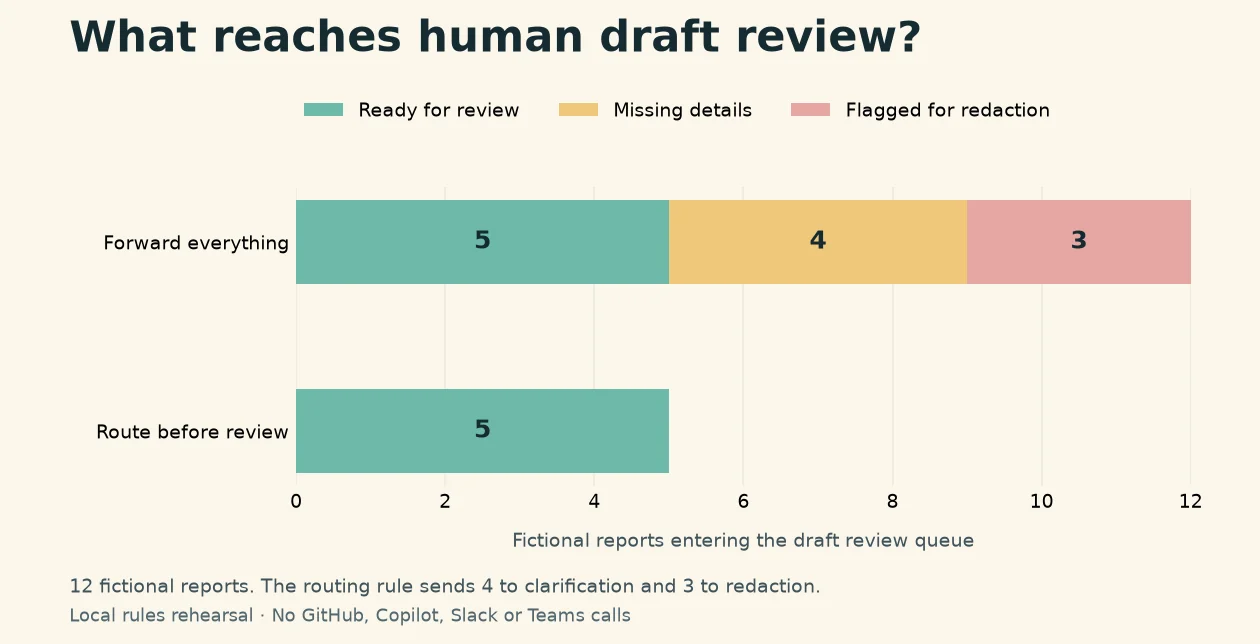
2026-11-10_chat-to-repro-issue/evidence/results.json; plot metadata: evidence/plot_metadata.json.This is useful first-hand evidence for the routing rule, not for the performance of GitHub, Copilot, Slack or Teams. The run recorded zero outbound network requests, zero model calls and zero issues created. It did not measure how long a real support person takes, whether a real engineer can reproduce a production defect, or whether an integration can safely access your organisation. The raw inputs, per-record outputs, results and commands are retained in the source package, including evidence/inputs.json, evidence/outputs.jsonl and evidence/commands.txt.
That limitation is not a weakness to hide. It tells a business what the next test must prove. A product-level pilot needs an authorised Slack or Teams workspace, a connected GitHub test account, a test repository with the right Issues settings, de-identified data and a person who can review every resulting issue. Until that exists, the honest claim is that the team has rehearsed a safe intake rule on synthetic data.
How Can You Run the Three-Lane Intake Procedure Next Monday?
The procedure below is designed for a small team with a support inbox or group chat, a test project and one person who can make the final filing decision. It can be run manually first. An integration is an optional later step, not a prerequisite.
Prerequisites
- One test or de-identified support report that does not contain live credentials, payment details or unnecessary personal information.
- A shared place for the draft, such as a protected document or a test channel, with a named reviewer.
- A test repository where Issues are enabled, the intended team has the required access and the project owner agrees to the visibility.
- A written redaction rule covering screenshots, recordings, customer identifiers and secrets.
- A stop and rollback plan: incomplete reports remain drafts, and an incorrectly filed issue can be closed or corrected by a human owner without triggering an automated code change.
Numbered procedure
- Freeze the boundary. Copy only the minimum information needed for the test. If a screenshot or recording may contain a customer name, email address, order number, access token or internal URL, mark it for redaction and do not forward it to an integration. Record whether the report is fictional, de-identified or approved for the test.
- Write the location. Name the page or workflow, device class, browser or app when relevant, account state and test or production environment. If the location is unknown, leave it visibly blank; do not infer it from the message tone.
- Write the replay steps. Put each action in chronological order, including the final click, tap or submission that produced the observed result. Keep the steps short enough that a colleague can follow them without the original conversation.
- Write expected and actual results. Put the expected outcome beside the observed outcome. If either side is unclear, route the report to clarification and ask one focused question, such as “Which page were you on?” or “What should the button have displayed?”
- Route into three lanes. Send complete and sanitised reports to draft review. Send missing fields to clarification. Send anything with an unresolved redaction flag to a human privacy or data owner. A report can move lanes only after the missing evidence or redaction decision is recorded.
- Replay with a second person. Ask somebody who did not write the report to follow the steps in the agreed test environment. They should record whether the screen, input, expected result and actual result are clear, and note any difference rather than silently correcting the report.
- File only after review. If the replay is clear and the project, visibility and owner are correct, a person may create the GitHub Issue or use an authorised Slack or Teams integration. Include the sanitised evidence, the reproduction steps, the expected and actual results, and the name of the person responsible for the next decision.
- Verify the destination. Check the repository, issue title, labels, attachment visibility and assigned owner. If an AI agent has been invited to investigate, confirm its permissions and the human review point before it reads private code or proposes a change.
- Record the outcome. Keep the original report, the review decision, the issue link or draft location, and any correction made during replay. This gives the next support person a traceable handoff rather than another unstructured conversation.
Verification criteria
The procedure passes only when an independent colleague can identify the exact location, follow the steps, distinguish expected from actual behaviour, see why the report entered its lane and understand what to do next. The attachment has to be safe for the destination. The issue must point to the intended repository, have a named owner and avoid implying that an unverified cause is already known. A clean title is useful, but it is not a substitute for the three evidence fields.
Stop condition
Stop before filing when the location, steps, expected result or actual result is missing; when an attachment needs redaction; when the destination project or visibility is uncertain; when nobody owns the next decision; or when the report would require access to a live system that has not been authorised. Leave the item in the draft or clarification lane and ask one specific question. Do not let an automation convert “unknown” into a confident sentence.
Rollback and human review
If the wrong repository or wrong visibility is selected, a human owner should stop further activity, correct or close the issue, remove unsafe attachments where possible and notify the relevant project owner. If an agent has already been given more access than intended, suspend that test path and review the account and permissions before continuing. Do not rely on a prompt saying “be careful” as a rollback mechanism. The rollback is a decision, an owner and a record of what changed.
Where Should AI and GitHub Fit?
Use the tools to remove repetition after the handoff is clear. An assistant can summarise a long thread into the three columns, point out that the browser is missing, draft a neutral issue title and suggest a label. GitHub’s Slack and Teams documentation also describes collaboration around issues, pull requests and Copilot cloud agent sessions. That makes a governed draft-to-issue workflow plausible for a small team that already has the required administration and licences.
Keep the human decision at the points where ambiguity or consequence rises. A model should not decide that a guessed page is correct, that a customer attachment is safe, that a repository is the right destination, or that a proposed code change is ready to merge. The integration can make the path shorter; it cannot make missing evidence appear.
This is the same operating principle behind an earlier RxAI discussion of human approval before high-risk actions. It also connects with our guidance on delegated AI workflows and governed tool access: define the task, constrain the data and permissions, keep a review point, and leave a record that somebody else can inspect.
What Should Australian SMB Leaders Measure Next?
The local rehearsal gives you a starting control check, not a business KPI. Once a team uses the handoff on approved cases, measure the workflow separately from the software brand. Useful measures include the share of reports that contain all three fields on first submission, the share routed to clarification, the share held for redaction, the time from intake to a reproducible draft, and the rate at which a second person can replay the steps without asking for new context.
Do not optimise only for the number of issues created. A higher filing count can mean that the team is forwarding noise faster. Pair volume with review quality: how many issues are returned because the project is wrong, how often the expected result was disputed, how many attachments needed removal, and how often an agent suggestion was corrected before filing. These measures let a manager see whether the handoff is improving work or merely moving messages between tools.
For an Australian SMB, the most useful first baseline may be qualitative. Ask the next person to mark each handoff as replayable, missing context or unsafe to forward. Review a small, approved sample in a weekly meeting. The labels are not a universal benchmark; they are a local vocabulary for deciding what to fix in the template, the support habit or the permission boundary.
What Is a Practical Rollout for the Week?
On Monday, choose one low-risk, fictional or de-identified website problem and write the three columns without an integration. On Tuesday, ask a colleague to replay it and note every question. On Wednesday, turn the corrected version into a draft GitHub Issue in a test repository, or keep it in the shared document if the integration prerequisites are not ready. On Thursday, review the attachment, repository access and human owner. On Friday, record what was missing and change the template by one small amount.
If the exercise reveals that your team cannot agree on the expected result, fix that definition before adding Copilot or an automatic filing route. If the issue is reproducible but the data boundary is unclear, fix the redaction and access process. If both are clear, you have a better candidate for a controlled pilot. RxAI’s Multi-Platform Growth Engine can help map that handoff into a broader workflow, but the first deliverable should remain a clear, reviewable operating rule.
The goal is not to make every support message look like a software ticket. It is to give the next person enough evidence to begin, enough context to stay within scope and enough human control to stop when the report is not ready. That is the foundation that makes any later AI or chat integration safer to evaluate.
Sources
- @GitHub in Slack and Teams is generally available and more — GitHub Changelog, 6 November 2026.
- Using GitHub in Slack — GitHub Docs, account connection, administrator installation and Copilot cloud agent workflow guidance.
- Using GitHub in Teams — GitHub Docs, Teams connection, issue and pull-request collaboration, and Copilot context.
- The GitHub app in Microsoft Teams is now generally available — Microsoft Teams Blog, 30 October 2026.
- Creating an issue — GitHub Docs, repository Issues settings and access prerequisites.
Frequently Asked Questions
It records the location and conditions, the ordered steps, and the expected result compared with the actual result so a second person can replay the report without the original conversation.
Stop when a required evidence field is missing, an attachment needs redaction, the repository or visibility is uncertain, or no human owner has accepted the next decision.
No. It verifies only a deterministic routing rule over 12 fictional reports. A product pilot still needs an authorised workspace, connected accounts, a test repository, appropriate permissions and human review.
Choose one fictional or de-identified support case, fill the three evidence columns, ask an independent colleague to replay it, and keep the final filing decision with a named human owner.
Want This Applied to Your Business?
RxAI offers a free 20-minute consultation to map how these strategies fit your operations. No obligation, no sales pitch.
Book Free Consultation